Material Property
|
Material properties are volume conditions in the Multiphase module pertaining to selected Volumes. The properties and conditions for the components and mixtures are specified in different modules-Flow, Heat and Common. The properties under the Multiphase module are interlinked with the properties under the same name in other modules. |
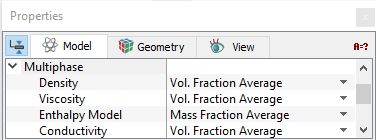
Density
The method for computingDensity of the mixture can be specified under both the Multiphase and Common modules as follows:
- Geometric Entities Panel > Volumes > [Desired Volume]
- Properties Panel > Model Tab > Multiphase > Mixture > Density > [Vol. Fraction Average or User Specified]
or
- Geometric Entities Panel > Volumes > [Desired Volume]
- Properties Panel > Model Tab > Common > Mixture > Density > [Vol. Fraction Average or User Specified]
|
Density of a mixture is computed from the densities of the individual components using either of the two methods:
|
Figure 5.101 - Density options |
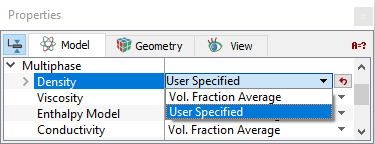
Density of components is specified only under the Common module as any of the following: Constant Density, Ideal Gas Law, Isentropic Gas Law, Compressible Liquid or User Specified using the Expression Editor.
Specify the Density of the components as shown below:
- Geometric Entities Panel > Volumes > [Desired Volume]
- Properties Panel > Model Tab > Common > Component {Name of the Component}> [Desired Option]
Viscosity
The Viscosity for the mixture can be specified under both the Multiphase and Flow module as follows:
- Geometric Entities Panel > Volumes > [Desired Volume]
- Properties Panel > Model Tab > Multiphase > Mixture > Viscosity > [Vol. Fraction Average or Mass Fraction Average or User Specified]
or
- Geometric Entities Panel > Volumes > [Desired Volume]
- Properties Panel > Model Tab > Flow > Mixture > Viscosity > [Vol. Fraction Average or Mass Fraction Average or User Specified]
|
Viscosity of a mixture is computed from the viscosities of the individual components using either of the three methods:
|
Figure 5.102 - Viscosity options |
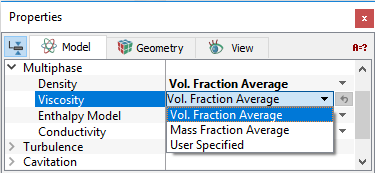
Viscosity of components is specified only under the Flow module as any of the following: Constant Dynamic Viscosity, Constant Kinematic Viscosity, Sutherland Law, Bingham Models, Herschel-Bulkley Model, User Defined Function (Non Newtonian) or User Specified using the Expression Editor.
Specify the Viscosity of the components as shown below:
- Geometric Entities Panel > Volumes > [Desired Volume]
- Properties Panel > Model Tab > Flow > Component {Name of the Component} > Viscosity > [Desired Option]
For Multiphase flow problems involving heat transfer, the following conditions, Enthalpy Model and Conductivity are specified.
Enthalpy Model
The Enthalpy Model for the mixture can be specified under both the Multiphase and Heat module as follows:
- Geometric Entities Panel > Volumes > [Desired Volume]
- Properties Panel > Model Tab > Multiphase > Mixture > Enthalpy Model > [Mass Fraction Average or User Specified]
or
- Geometric Entities Panel > Volumes > [Desired Volume]
- Properties Panel > Model Tab > Heat > Mixture > Enthalpy Model > [Mass Fraction Average or User Specified]
|
Enthalpy Model of a mixture is computed from the enthalpies of the individual components using either of the two methods:
|
Figure 5.103 - Enthalpy model |
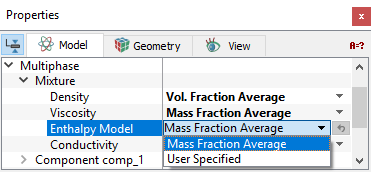
The Enthalpy Model of the components are specified only under the Heat module as any of the following: Constant Capacity, JANAF Table, User Defined Function (Non Newtonian) or User Specified using the Expression Editor.
Specify the Enthalpy Model of the components as shown below:
- Geometric Entities Panel > Volumes > [Desired Volume]
- Properties Panel > Model Tab > Heat > Component {Name of the Component} > Enthalpy Model > [Desired Option]
Conductivity
Conductivity of a mixture can be specified under both the Multiphase and Heat module as follows:
- Geometric Entities Panel > Volumes > [Desired Volume]
- Properties Panel > Model Tab > Multiphase > Mixture > Conductivity > [Vol. Fraction Average or User Specified]
or
- Geometric Entities Panel > Volumes > [Desired Volume]
- Properties Panel > Model Tab > Heat > Mixture > Conductivity > [Vol. Fraction Average or User Specified]
|
Conductivity of a mixture is computed from the conductivities of the individual components using either of the two methods:
|
Figure 5.104 - Conductivity options |
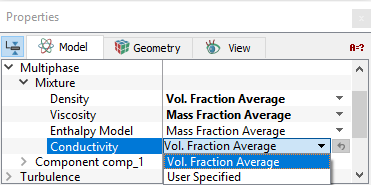
Conductivity of the components is specified only under the Heat module using any of the following: Constant Prandtl Number, Constant Conductivity or User Specified using the Expression Editor.
Specify the Conductivity of the components as shown below:
- Geometric Entities Panel > Volumes > [Desired Volume]
- Properties Panel > Model Tab > Heat > Component {Name of the Component} > Conductivity > [Desired Option]
Surface Tension
|
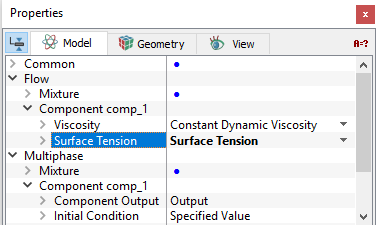
This allows considering the surface tension for components in a selected volume. The Surface Tension can only be activated under the Flow module for the components making up the mixture. Specify the Surface Tension for the components in the selected volumes as given below:
Surface Tension and the associated Value should only be selected for one of the components. (The others should be set to Surface Tension > No). Whether surface tension needs to be activated depends on its magnitude relative to momentum and other forces. Weber number and Bond number serve as a measure whether to activate surface tension. |
Figure 5.105 - Surface tension |
|
Note: Surface tension depends on the combined properties of the fluids on either side of the interface. But for the current release, surface tension is limited to associating it to only one component, even for multiple fluids. |